AM FITNESS
Your test drive
0 / 12 done

Self-guided · ~10 minutes · no one looking over your shoulder

Take it for a test drive

12 real situations from your gym week. Tap one open, follow the steps in the live demo, and notice the “wow” at the end. Tick each off — your progress saves on this phone.
Open the demo apps & log in →

Tip: keep the demo app open in one tab and this checklist in another.

① Money & dues — stop the leak first

Find out who hasn’t paid — in two taps

The money that quietly slips away every month, now on one screen.
tap to open ▾
THE SITUATION

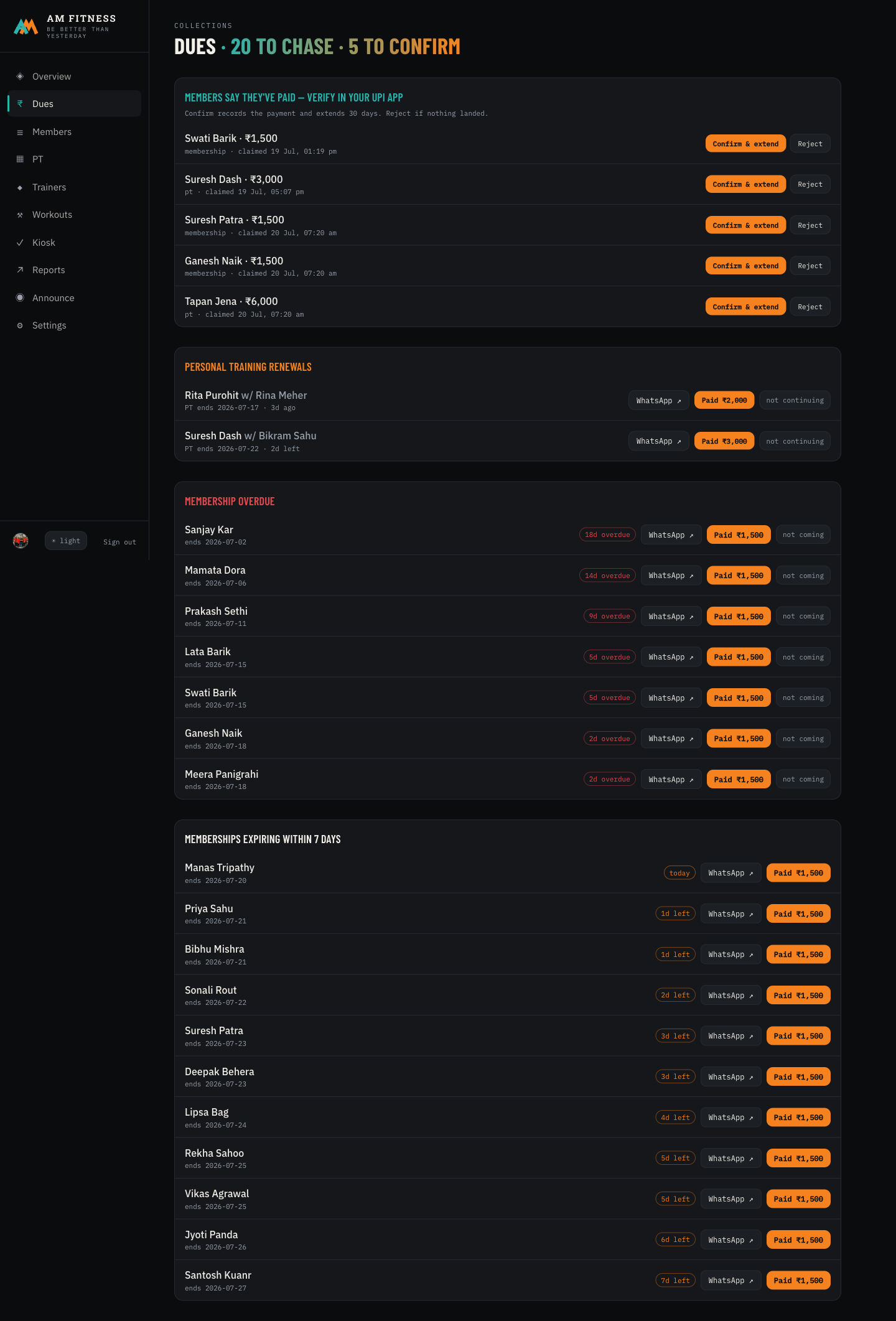
It’s the 1st. Who’s overdue? Who’s about to lapse? Normally that means scrolling a register.

  1. 1Open Dues from the left menu.
  2. 2Read the header: how many to chase, how many claims to confirm.
  3. 3Scroll: Overdue, then Expiring within 7 days — sorted by urgency.
Dues page 1 3

① “20 to chase · 5 to confirm” at a glance ③ every overdue member, most-overdue first

The wow: every rupee owed to you this month, in one glance — no register, no guessing.

A member says “I’ve paid on UPI” — confirm it instantly

No more he-said-she-said about payments.
tap to open ▾
THE SITUATION

A member paid you on UPI from home and tapped “I’ve paid” in their app. You just need to confirm it landed.

  1. 1On Dues, look at the top card: “Members say they’ve paid.”
  2. 2Check the amount against your UPI app.
  3. 3Tap Confirm & extend — it records the payment and adds 30 days automatically.
Dues page — claims 1 3

① members’ self-reported payments ③ one tap confirms + extends the membership

The wow: the member did the data entry for you. You just tap once to confirm.

Chase a lapsed member without typing a word

A friendly reminder that takes one tap, not ten minutes.
tap to open ▾
THE SITUATION

Three people are overdue. You want to nudge them on WhatsApp — politely, with the amount and your UPI.

  1. 1On any overdue member, tap WhatsApp ↗.
  2. 2A ready-written reminder opens — name, amount, UPI, all filled in.
  3. 3When they pay, tap the orange Paid ₹1,500 to record it and extend 30 days.
Dues page — reminders 1 3

① one-tap WhatsApp reminder (pre-written) ③ one-tap “Paid” records + renews

The wow: “Never chase a payment on WhatsApp again” — the message writes itself.

② Members — sign up & know everyone

Sign up a walk-in in under a minute

A new face at the door shouldn’t mean paperwork.
tap to open ▾
THE SITUATION

Someone walks in wanting to join. You want them signed up before they change their mind.

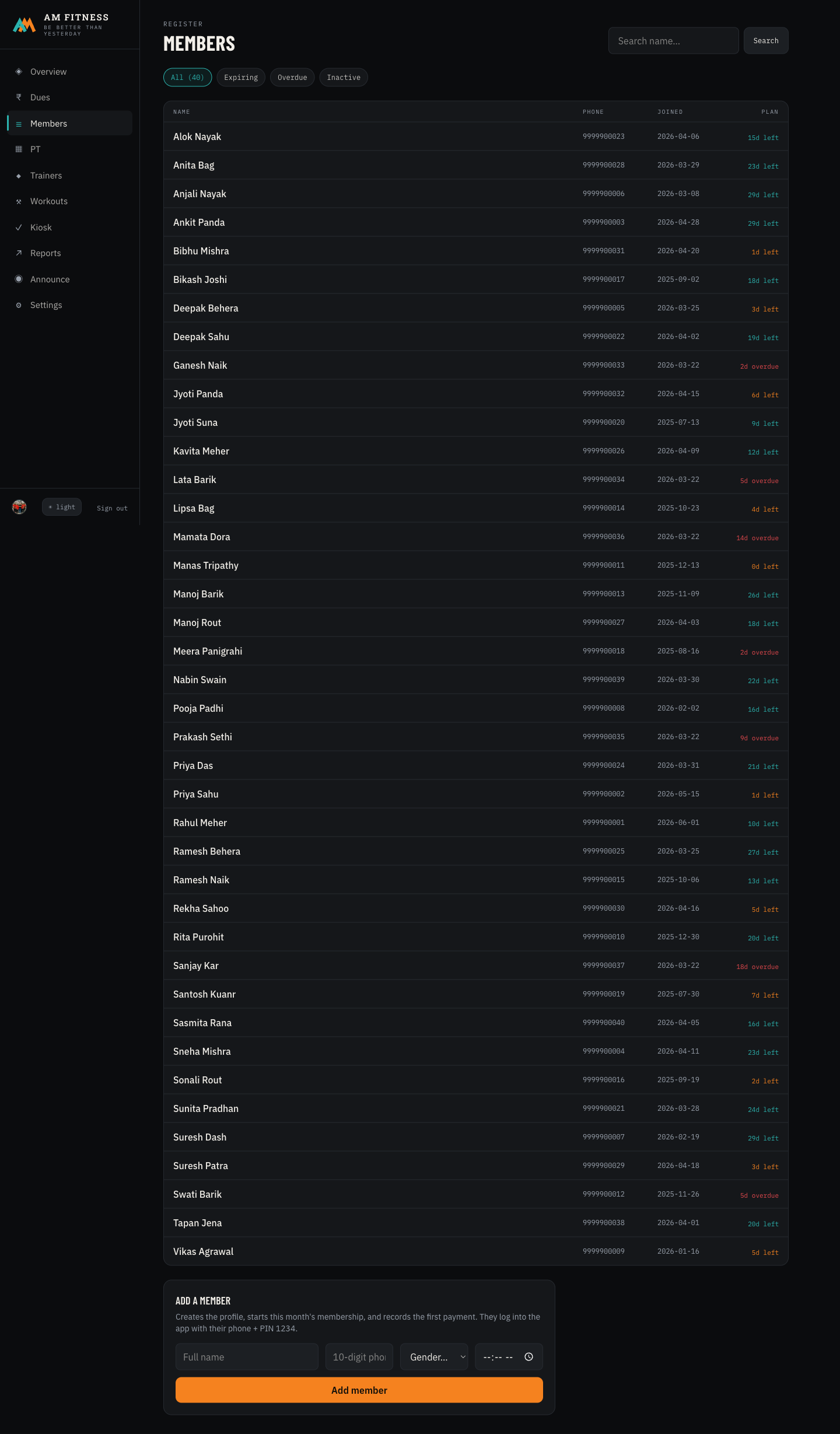
  1. 1Open Members, scroll to Add a member.
  2. 2Type their name and phone. Pick a gym-time if they know it.
  3. 3Tap Add member — their membership + first payment are recorded together.
Members page 1

① the full member roster with validity at a glance — the add form sits at the bottom

The wow: name + phone and they’re in — their membership card is live in their app instantly.

A member’s whole story on one screen

Payments, attendance, plan, coach — no flipping through books.
tap to open ▾
THE SITUATION

A member asks “when does mine expire?” or “how many times did I come?” You want the answer in two seconds.

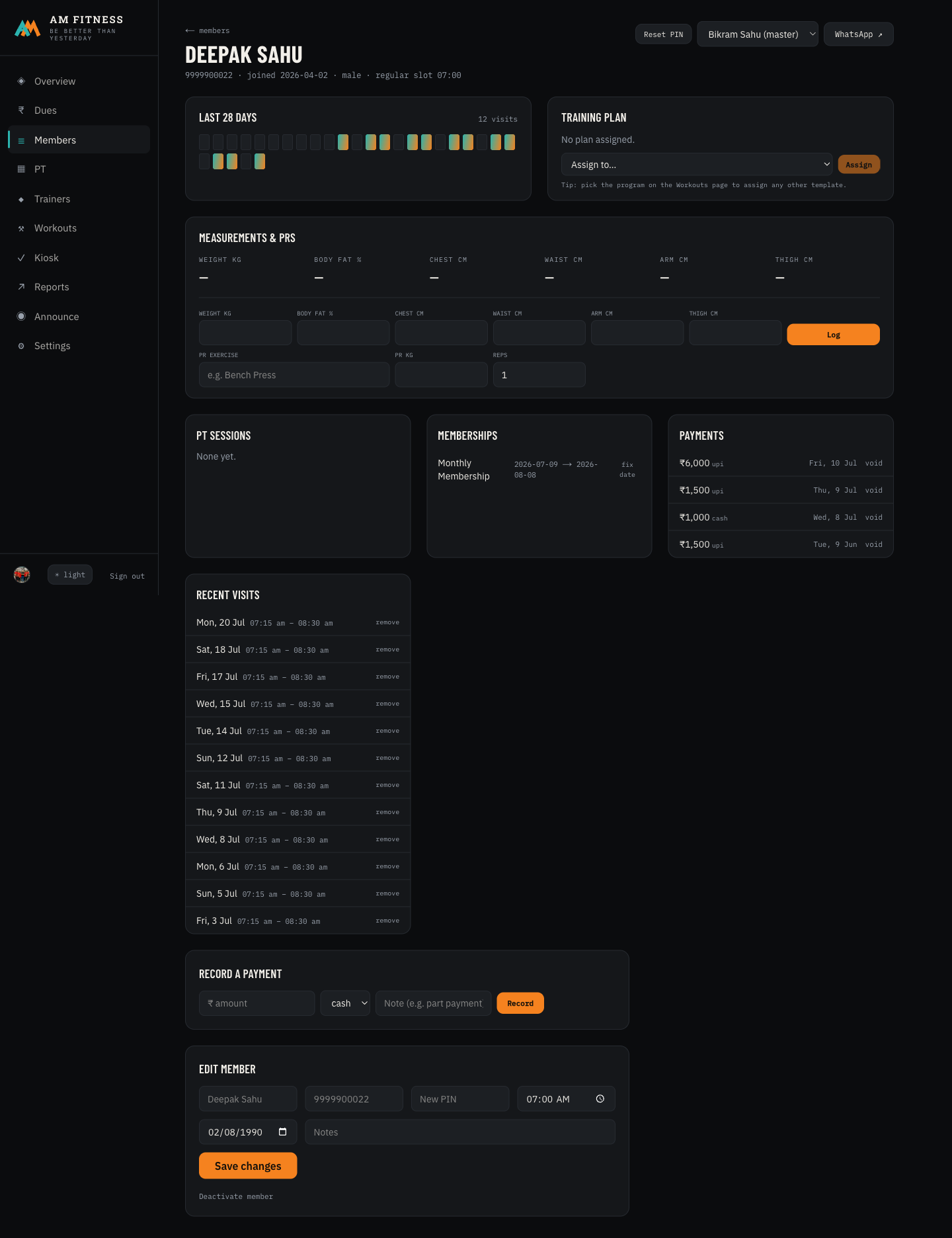
  1. 1From Members, tap any name.
  2. 2See their membership card, payment history, and this month’s attendance grid.
  3. 3Fix a wrong date, record a payment, or reset their PIN — right here, all logged.
Member detail 2

② one member — plan, dues, attendance, coach, payments — all in one place

The wow: every answer about a member in two taps, and every correction is safely logged.

③ The floor — attendance & who’s in

Check someone in at the door

A front-desk screen anyone can run in a second.
tap to open ▾
THE SITUATION

Members are streaming in. You want a clean record of who came, without a paper register.

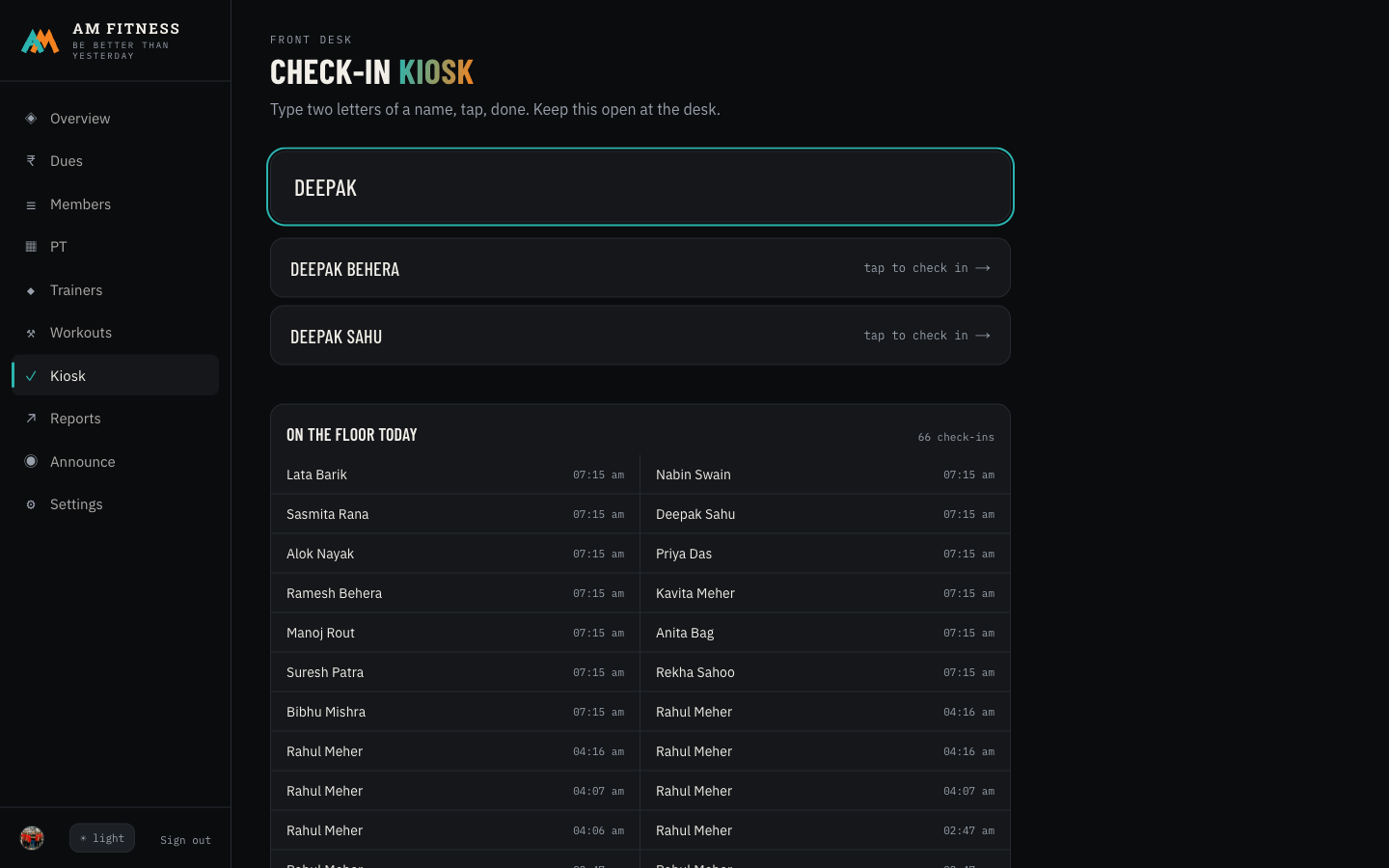
  1. 1Open Kiosk. Start typing a name or phone.
  2. 2Tap the matching member.
  3. 3A big “{name} is in!” confirms it — attendance recorded.
Kiosk search 1 2

① type a name ② tap to check in — instant, no register

The wow: your attendance register is now automatic, searchable, and always accurate.

See who’s in the gym right now — from your couch

Run your gym even when you’re not standing in it.
tap to open ▾
THE SITUATION

It’s evening, you’re home. Is it busy? How many came today? How much did you collect this month?

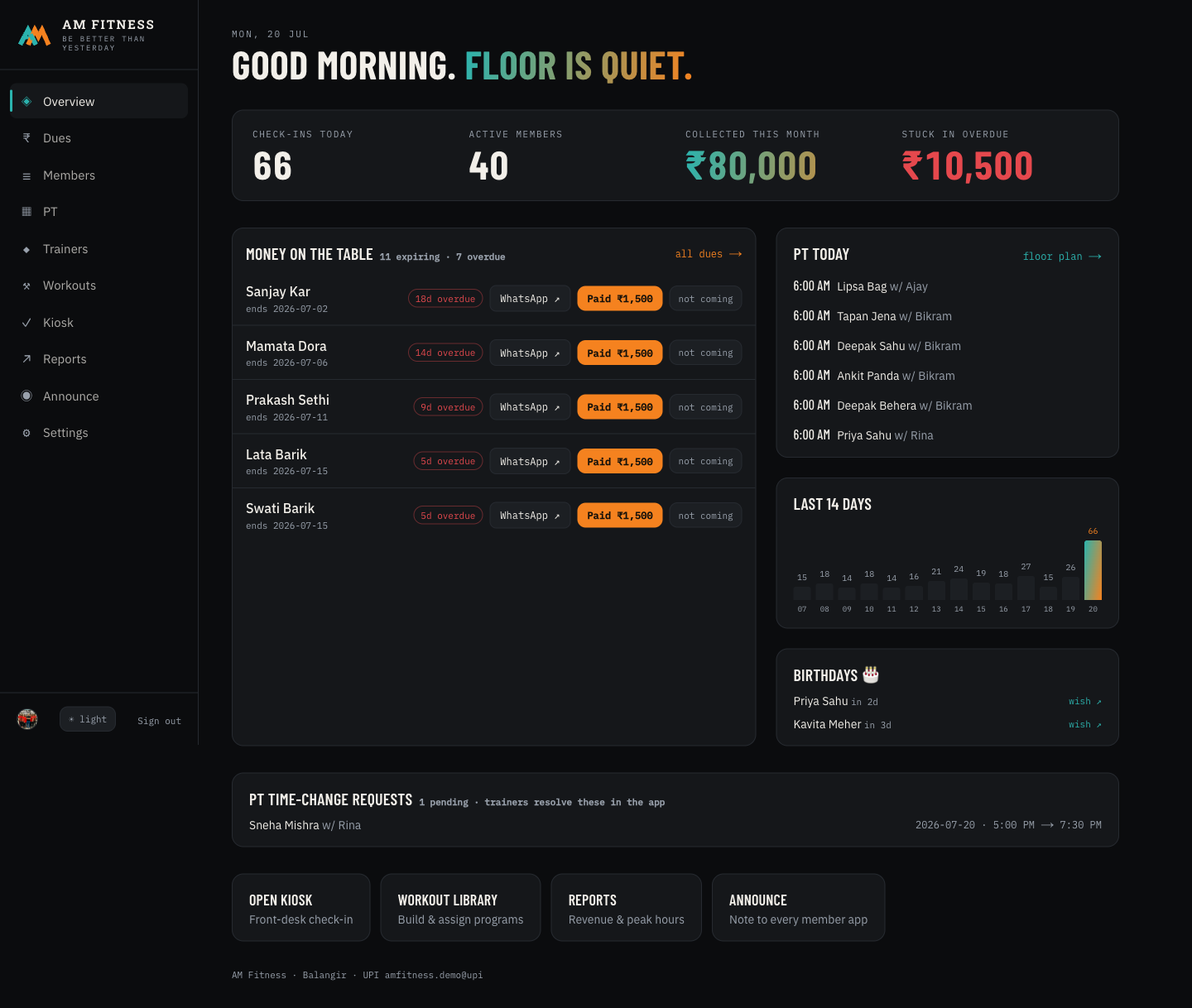
  1. 1Open Overview — the first screen.
  2. 2Read the tiles: check-ins today, live headcount, this month’s collection, money stuck in overdue.
  3. 3Glance at the 14-day attendance bars and today’s PT slots.
Overview 2

② today’s check-ins, live count, collection, and overdue — the whole gym in four numbers

The wow: the pulse of your gym in your pocket — no need to be at the desk to know how it’s doing.

④ Trainers & personal training

See every trainer’s PT floor at a glance

Who’s coaching whom, at which hour — no clashes, no confusion.
tap to open ▾
THE SITUATION

You want to place a new PT client into a free slot, or see which trainer has room.

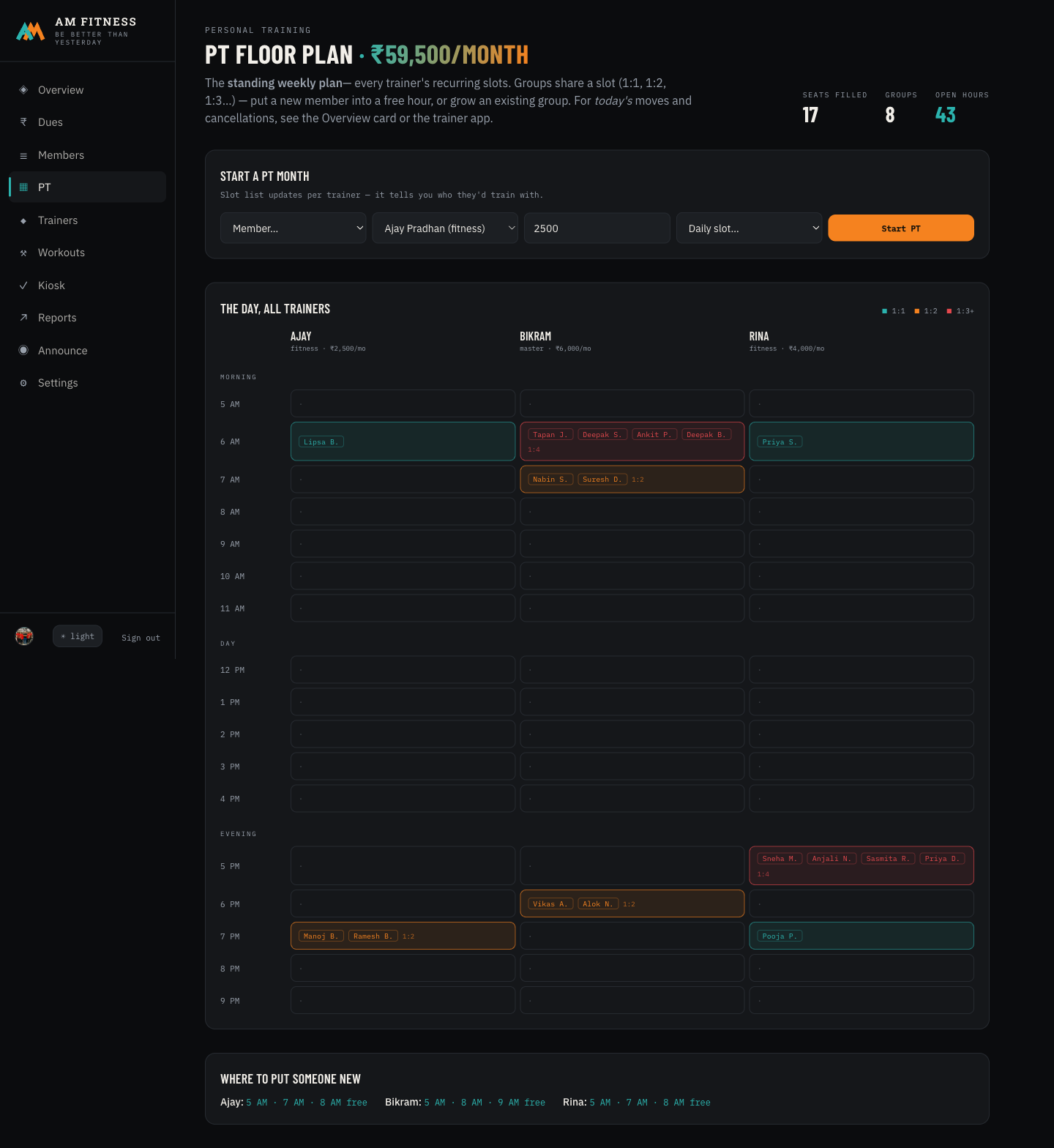
  1. 1Open PT. Each trainer shows their hourly slots.
  2. 2Green = free, orange = who’s already in that group (1:1, 1:2, 1:3…).
  3. 3Use Start a PT month to place a member into a slot — fee + payment recorded.
PT floor 2

② the whole PT floor — who’s with which coach, at which hour

The wow: PT scheduling that used to live in your head is now a clear grid anyone can read.

Manage trainers & their clients

Rates, profiles, client lists, and PIN resets in one place.
tap to open ▾
THE SITUATION

You want to set a trainer’s monthly PT rate, or see who their clients are.

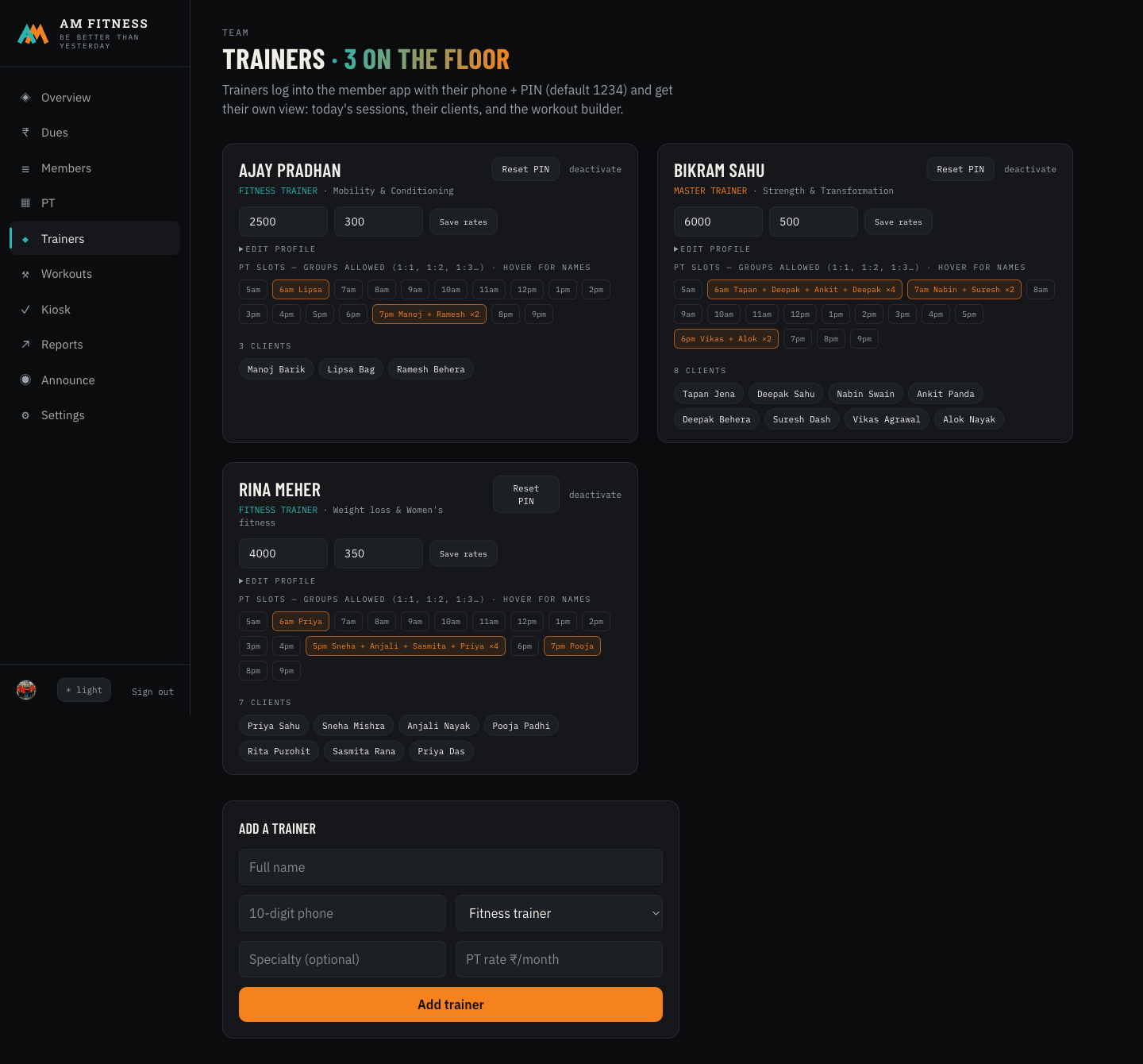
  1. 1Open Trainers. Each card shows their tier, clients, and PT slots.
  2. 2Set their monthly & single-session rates; edit their profile.
  3. 3If a trainer forgets their app PIN, tap Reset PIN and share the new one on WhatsApp.
Trainers 1

① each trainer — rates, clients, slots, and a one-tap PIN reset

The wow: your whole coaching team, organised — and they log into their own app to see today’s clients.

⑤ Reports, broadcasts & what members see

Know this month’s revenue & your busiest hours

Decisions from numbers, not gut feel.
tap to open ▾
THE SITUATION

Should you add a morning trainer? Which plan sells? You want the numbers, not a hunch.

  1. 1Open Reports.
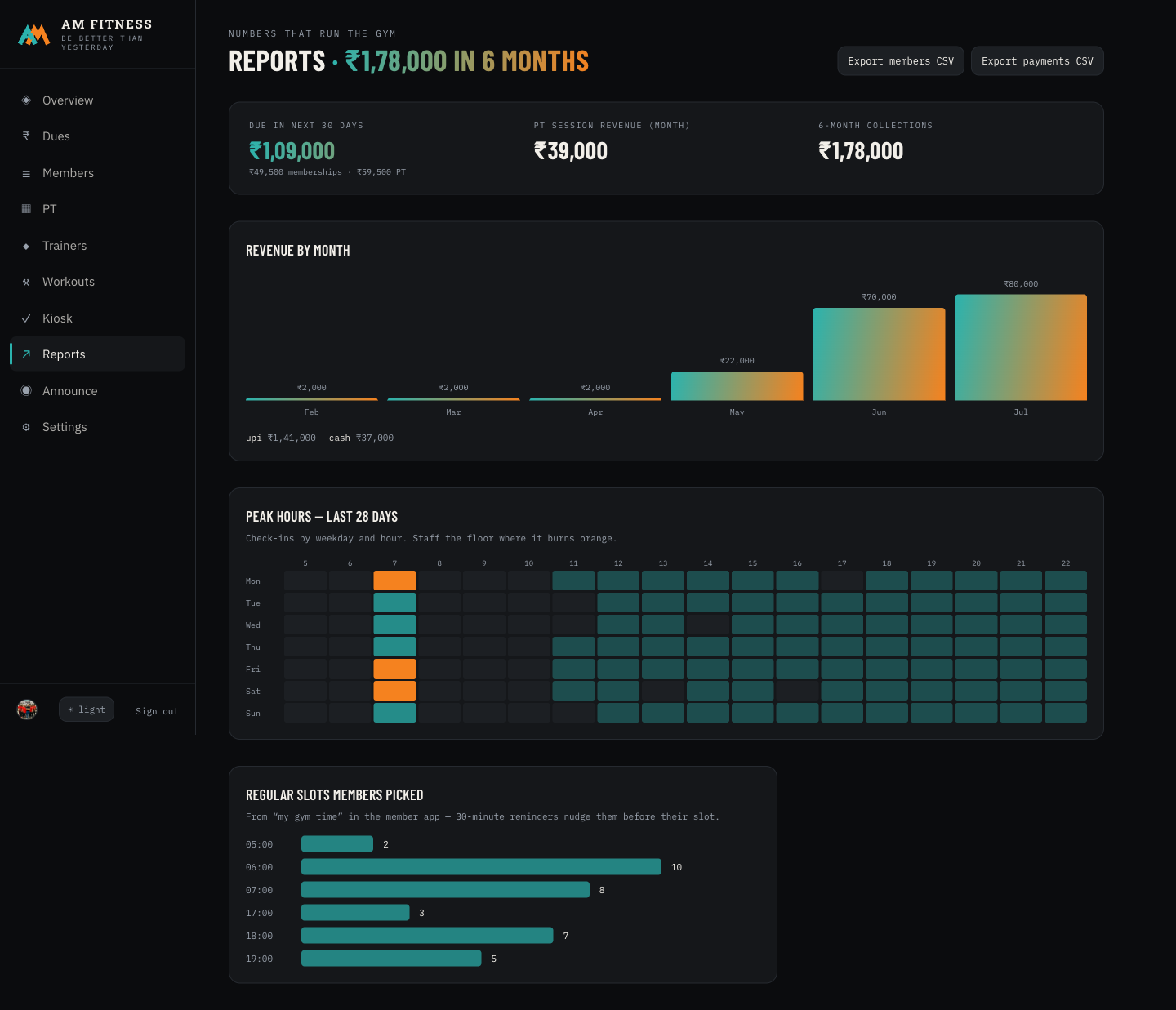
  2. 2See revenue by month, payment methods, and a peak-hours heatmap.
  3. 3Export members or payments to a spreadsheet any time.
Reports 2

② revenue trend, payment mix, and when your floor is busiest

The wow: you finally know your busiest hour and your best month — in colour, in seconds.

Post to every member’s phone instantly

One message, everyone hears it — no broadcast list to maintain.
tap to open ▾
THE SITUATION

Holiday hours, a new offer, new equipment — you want every member to know, now.

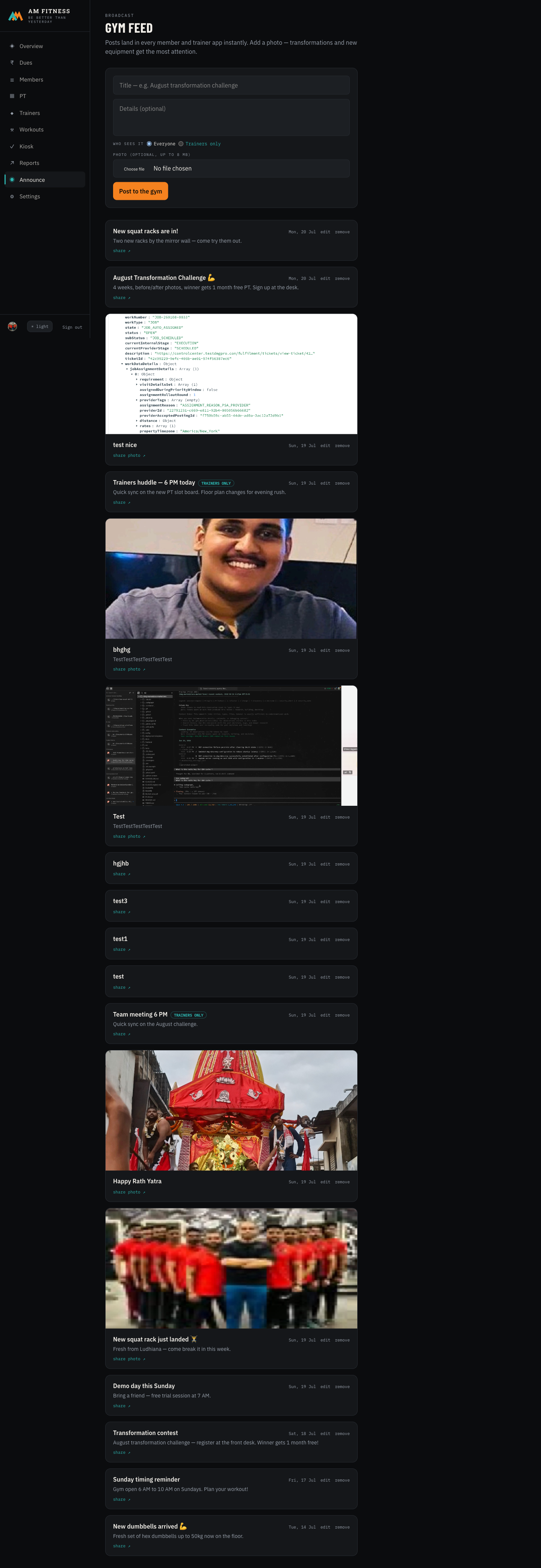
  1. 1Open Announce. Write a title and details; add a photo if you like.
  2. 2Choose Everyone or Trainers only.
  3. 3Tap Post to the gym — it lands in every member’s app feed.
Feed composer 1

① write once — it reaches every member’s phone, no broadcast list needed

The wow: your own gym “broadcast channel” — with photos — without saving 300 numbers.

See exactly what your members get

A polished app with your name on it — that keeps them coming back.
tap to open ▾
THE SITUATION

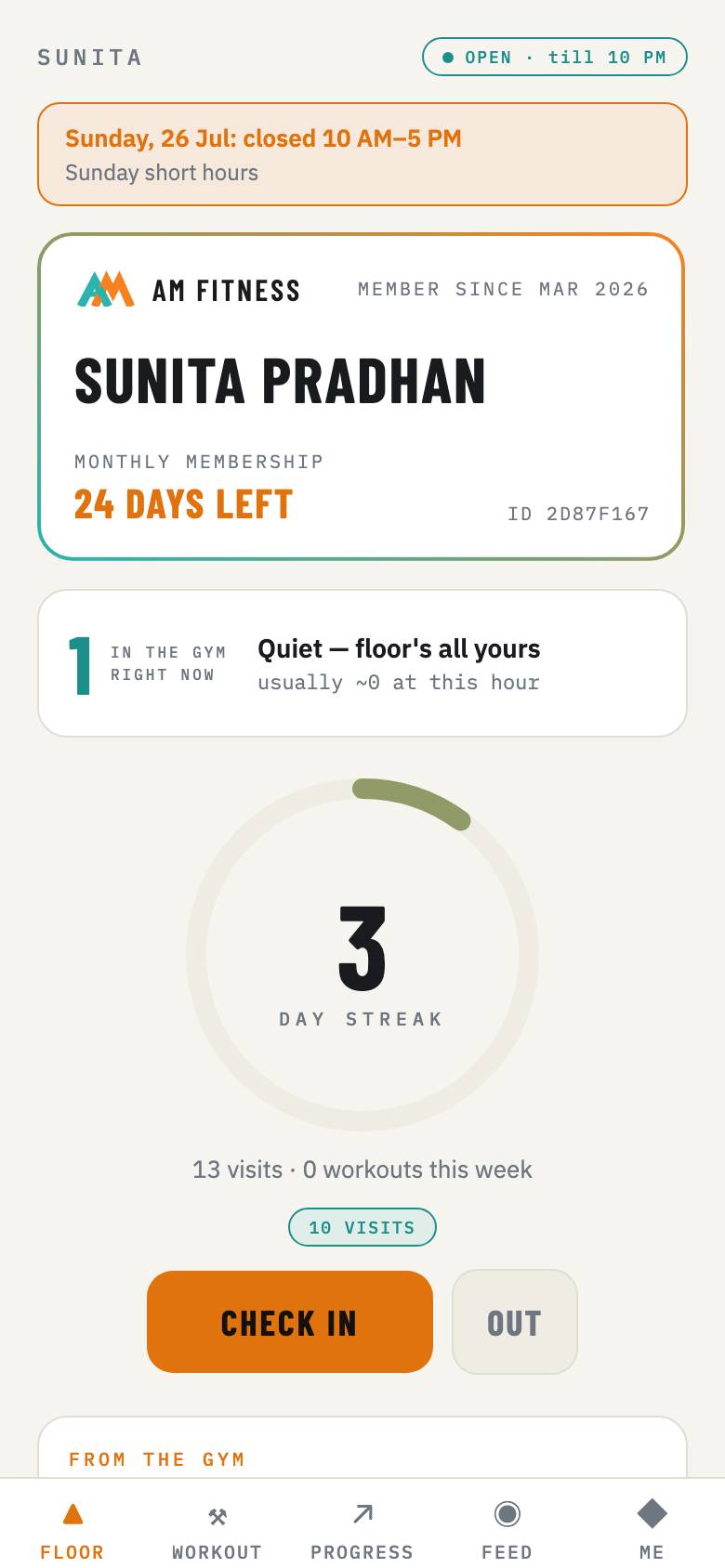
Your members download an app with a digital card, their streak, their workout, and your feed.

  1. 1Open the member app (link on the access page) and log in as a demo member.
  2. 2See the membership card, live gym status, and the streak ring.
  3. 3Tap Check in, open Workout, log a lift in Progress.
Member app home 2 3

② their digital membership card + streak ③ one-tap check-in, workout & progress

The wow: members feel like they belong to a modern gym — the streak alone brings them back.

Finished the drive?

Tell us what clicked and what didn’t — it takes 60 seconds.

Share your feedback → See what this is worth to you →